🌦 IoT Weather Monitoring System (Local — No External API)
A local IoT project that reads temperature and humidity from a DHT11
connected to an Arduino UNO R4 , sends readings over USB serial
to a Python Flask server, and displays live values on a local web dashboard.
Quick Highlights
Real-time sensor readings (DHT11)
No external APIs or cloud required
Python (Flask) backend + simple web UI
Serial communication via USB (pyserial)
Features
Live temperature & humidity display (auto-refresh)
Simple HTML dashboard (templates/index.html)
Stable serial handling for single-client COM access
Easy to extend: CSV logging, charts (Chart.js), Wi-Fi ESP porting
Hardware
Arduino UNO R4
DHT11 sensor (or DHT11 module)
USB cable, jumper wires
(If bare DHT11) 10 kΩ pull-up resistor between VCC and DATA
Sensor Wiring (DHT11 → Arduino UNO R4)
DHT11
Arduino
VCC
5V
DATA
D2
GND
GND
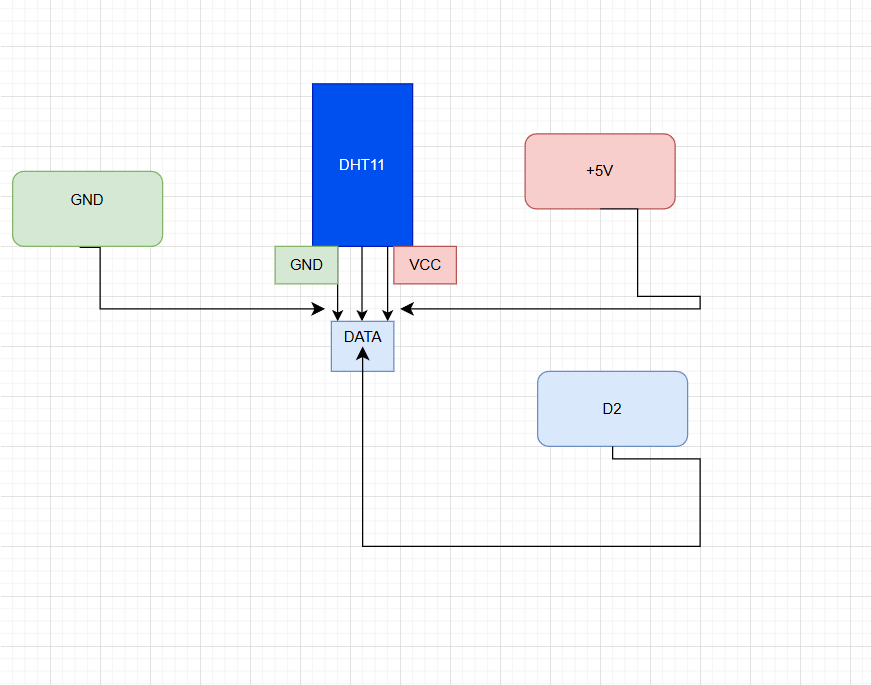
Schematic Diagram
This diagram shows the connection between the DHT11 sensor,
Arduino UNO R4, and the Python Flask web application.
Software Dependencies
Warning: You should run your IDE in administrator mode
Windows (development target)
Python 3.8+
Arduino IDE (to upload sketch)
Python packages: Flask, pyserial
Install Dependencies
Copy
pip install flask pyserial
Expected Arduino Serial Output
One line per reading (human-readable). Example:
Temperature: 28 °C | Humidity: 65 %(The backend parses this string to extract values.)
Project Layout
WEATHERAPPIOT/
├── app.py
├── templates/
│   └── index.html
└── DHT/
    └── DHT.ino
Run (Minimal)
Upload DHT/DHT.ino to Arduino UNO R4.
Close Arduino Serial Monitor.
Connect Arduino via USB.
From project folder run:
Run the Server
Copy
python app.pyOpen:
Copy
http://127.0.0.1:5000Disable Flask Auto-Reloader
Copy
app.run(use_reloader=False)
Troubleshooting
COM access denied: close Arduino IDE / Serial Monitor and retry.
Wrong data format: confirm Arduino prints the exact format.
High latency: confirm baud rate and avoid blocking serial reads.
Improvements / Roadmap
Persistent logging to CSV or database
Real-time charts (Chart.js)
Alert system (threshold-based)
Mobile-friendly UI
Wi-Fi version with ESP8266/ESP32